Introduction
Managing inventory efficiently is essential for businesses that handle products, raw materials, finished goods, and frequent warehouse movements. When inventory operations depend on manual data entry, spreadsheets, or paper-based records, businesses may experience incorrect stock quantities, picking errors, delayed dispatches, and difficulties tracking products across multiple storage locations.
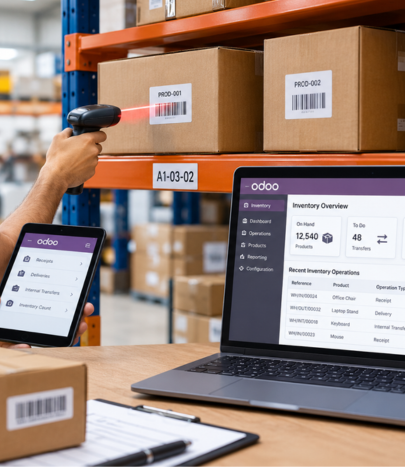
Odoo Barcode Inventory Management offers a practical way to streamline these processes by connecting barcode scanning with inventory operations in the Odoo ERP system. Warehouse employees can scan products, packaging, and storage locations to process stock movements with less manual entry and better visibility into inventory records.
What Is Odoo Barcode Inventory Management?
Odoo Barcode Inventory Management uses the Odoo Barcode application to process inventory-related activities through barcode scanning. Instead of manually searching for products and entering quantities for every operation, warehouse employees can scan the appropriate barcode to identify items and record inventory movements.
The barcode functionality works with Odoo’s Inventory application and can support workflows such as incoming receipts, outgoing deliveries, internal transfers, and inventory adjustments.
Businesses can assign barcodes to individual products, product variants, packaging, and warehouse locations. Depending on the configuration, they can also use lot numbers, serial numbers, and supported barcode formats to track products more precisely.
For example, when a warehouse receives a shipment of 100 components, employees can scan the relevant product barcodes, verify the quantities, and process the receipt in Odoo. This reduces repeated manual entry and helps keep inventory records aligned with physical stock movements.
By connecting warehouse activities to a shared ERP system, Odoo helps businesses maintain more consistent inventory information across their operations.
Why Do Businesses Need Barcode-Based Inventory Management?
Traditional inventory management can become difficult as a company expands its product catalog, warehouse capacity, customer base, and order volume.
Common challenges include:
- Manual data entry errors: Employees may enter incorrect product codes, quantities, or item descriptions.
- Slow stock receiving: Warehouse teams must manually identify products and record incoming quantities.
- Picking and dispatch mistakes: Similar-looking products or incorrect quantities can lead to fulfillment problems.
- Limited stock visibility: Inventory records may not reflect physical movements until someone updates them.
- Difficult stock tracking: Identifying the location of individual products can become challenging in large warehouses.
- Time-consuming inventory counts: Employees may need to compare physical stock against system records manually.
Odoo barcode scanning helps address these challenges by making product identification and inventory transactions more structured. It does not eliminate every possible error, but it reduces dependence on repetitive manual input when workflows are configured correctly.
Key Features of Odoo Barcode Inventory Management
1. Product Barcode Management
Each product or product variant can have its own barcode. When a warehouse employee scans it, Odoo can identify the corresponding item and associate it with the inventory operation being processed.
This is particularly useful for businesses that manage hundreds or thousands of SKUs.
For example, a company selling products in different sizes or colors can maintain distinct barcodes for individual variants. This helps employees select the correct item while receiving, storing, or picking products.
Odoo also supports product packaging barcodes, allowing configured packaging units to be identified during relevant inventory operations.
2. Faster Incoming Goods Receipts
Receiving inventory involves checking delivered products against purchase orders and recording the quantities received.
With Odoo Barcode, warehouse staff can open the relevant receipt, scan the products, check quantities, and validate the operation once the goods have been verified.
This makes it easier to process supplier deliveries while maintaining a record of incoming stock.
Business benefits include:
- Less repetitive product selection.
- Faster identification of received items.
- Improved visibility into incoming inventory.
- More consistent receipt processing.
3. Efficient Picking and Outgoing Deliveries
Order fulfillment requires employees to select the right products and quantities before dispatch.
Using barcode scanning, warehouse teams can process delivery orders by scanning products and, where configured, source locations and packages. Employees can compare scanned items against the delivery order before validating the transfer.
This is useful for e-commerce warehouses, wholesale distributors, and businesses that handle frequent customer shipments.
A structured scanning process can help reduce incorrect-item dispatches and improve fulfillment accuracy.
4. Internal Warehouse Transfers
Businesses often move products between storage locations, shelves, production areas, and dispatch zones.
Odoo supports barcode-based processing for configured internal transfers. Employees can scan relevant location and product barcodes to record movements within the warehouse.
For example, a product may move from a receiving area to a storage rack and later to a packing station. Recording these movements in Odoo improves traceability and helps employees identify where stock should be stored or collected.
This is especially helpful for warehouses with multiple storage locations or complex picking routes.
5. Inventory Adjustments and Stock Counts
Regular physical stock counts help businesses identify differences between recorded inventory and actual quantities.
Odoo Barcode can support inventory adjustments by allowing users to scan products and record the quantities found during a count.
Rather than relying entirely on handwritten lists, employees can use a more structured process for counting items and recording results.
Once the required inventory adjustment is reviewed and applied, the system can reflect the verified stock quantities.
Businesses should still establish procedures for investigating discrepancies, approving adjustments, and documenting damaged or missing goods.
6. Lot and Serial Number Tracking
Some businesses need more detailed product traceability than a standard SKU provides.
Odoo supports barcode workflows for lot and serial number tracking, subject to product settings and the relevant operations.
Lot tracking is useful when a group of products shares a production batch or lot number. Serial tracking identifies individual units with unique serial numbers.
These capabilities can support businesses that need to trace product batches, investigate quality issues, manage warranty information, or identify specific items involved in a transaction.
The exact tracking workflow should be configured according to the company’s operational and regulatory requirements.
7. Warehouse Location Barcodes
Product identification is only one part of inventory control. Employees also need to know where products are stored.
Odoo can assign barcodes to warehouse locations, allowing staff to scan a location when performing supported movements.
For example, a warehouse may use location identifiers such as:
- WH/Stock/Shelf-A
- WH/Stock/Shelf-B
- WH/Packing
- WH/Dispatch
With properly configured location tracking, employees can follow consistent put-away and picking procedures rather than relying on memory or handwritten notes.
8. Barcode and GS1 Support
Odoo supports standard barcode nomenclature as well as GS1 barcode nomenclature. The appropriate setup depends on the barcode formats used by the business and the information it needs to capture.
GS1 barcodes can encode structured information such as product identifiers, lot numbers, quantities, and other supported data.
Before implementation, businesses should verify barcode compatibility, scanner behavior, product configuration, and any requirements from suppliers or trading partners.
For detailed configuration instructions, refer to the official Odoo Barcode documentation.
How to Implement Odoo Barcode Inventory Management
A successful implementation begins with understanding the existing warehouse workflow rather than simply installing the application.
Step 1: Review Current Inventory Processes
Identify how your business currently receives products, stores inventory, fulfills orders, transfers stock, and conducts physical counts.
Document common problems such as incorrect picking, delayed updates, duplicate product records, and difficulty locating items.
This assessment will help determine where barcode scanning can deliver the greatest operational value.
Step 2: Clean and Organize Product Data
Review product names, internal references, variants, units of measure, packaging information, and existing barcode values.
Duplicate SKUs and incorrect product records should be resolved before barcode scanning is introduced.
Accurate master data is essential because scanning an incorrect or duplicated identifier can still cause inventory problems.
Step 3: Configure the Odoo Barcode Application
Enable the Barcode functionality in the Inventory application’s settings and select the appropriate barcode nomenclature.
Configure products, product variants, packaging, storage locations, and tracking requirements according to your business processes.
Odoo’s configuration options can differ by version, so implementation instructions should match the version used by your company.
Step 4: Select Compatible Barcode Equipment
Choose barcode scanners or supported mobile devices based on warehouse conditions and employee requirements.
Evaluate scanner compatibility, connectivity, scan speed, battery life, screen usability, and performance in areas with limited network coverage.
Test the equipment with your actual labels and product barcodes before purchasing devices for the entire warehouse.
Step 5: Configure Warehouse Workflows
Determine how employees will handle incoming receipts, put-away activities, picking, packing, internal transfers, delivery orders, and inventory counts.
Define when operations require verification and validation. Establish procedures for missing barcodes, damaged labels, unexpected quantities, and barcode mismatches.
For businesses with specialized requirements, customization may be appropriate.
Step 6: Test With Real Warehouse Scenarios
Before a full rollout, test common and exception-based situations, including:
- Receiving a partial supplier delivery.
- Scanning products with multiple variants.
- Moving products between storage locations.
- Picking and dispatching a customer order.
- Recording products with lot or serial numbers.
- Counting stock and resolving discrepancies.
The goal is to confirm that scanned operations produce the expected inventory results.
Step 7: Train Employees and Monitor Performance
Provide practical training for warehouse employees, supervisors, and inventory managers.
Monitor indicators such as picking accuracy, receiving time, stock discrepancies, order processing time, and the number of transactions requiring correction.
Use these measurements to improve workflows after implementation.
Common Odoo Barcode Implementation Mistakes to Avoid
Even a capable inventory system can produce poor results when its setup does not reflect actual warehouse operations.
Using duplicate or incorrect barcodes: Ensure each identifier maps to the intended product or variant according to the configured barcode rules.
Ignoring warehouse locations: Product scanning alone may not provide sufficient control when businesses store stock across numerous racks and zones.
Choosing incompatible scanners: Test the selected devices with the Odoo setup before expanding deployment.
Skipping workflow validation: Scanning products and validating inventory transactions are distinct steps in many workflows. Employees must understand the correct process.
Over-customizing too early: Begin with standard Odoo functionality wherever practical. Customize only when a documented business requirement cannot be handled adequately through standard configuration.
Neglecting employee training: Warehouse staff need clear instructions for exception handling, incorrect scans, stock mismatches, and failed transactions.
Ignoring ongoing maintenance: Review damaged labels, missing barcodes, inventory discrepancies, and changes to product or warehouse data regularly.
Common AEO Mistakes Businesses Should Avoid
As interest in AI search grows, businesses may encounter optimization tactics that promise fast visibility. A sustainable strategy requires more care.
Publishing large volumes of generic AI content: Using AI tools is not inherently a problem, but mass-producing pages without original value can create low-quality content that serves neither users nor the business.
Ignoring traditional SEO: Technical accessibility, indexing, helpful content, and clear website structure remain important for discovery.
Adding unnecessary technical files: Do not assume that special AI text files or unsupported markup are required to appear in AI-powered search results. Follow current guidance from the relevant platform.
Overusing keywords and questions: Repeating the same phrases unnaturally makes content harder to read and does not guarantee visibility.
Making unsupported ranking claims: No agency or tool can guarantee that a website will be cited by an AI system or appear in every generated answer.
Measuring only rankings: Rankings are useful, but businesses should also examine relevant traffic, enquiries, conversions, and available search performance data.
Why Choose Brainwings Infotech for Odoo Development?
Implementing Odoo successfully requires a clear understanding of business workflows, accurate data, suitable configuration, and reliable testing.
Brainwings Infotech provides Odoo development services for businesses that want to streamline operations using ERP technology.
Our services include Odoo ERP development, customization, integration, consulting, migration, and implementation. We can help businesses assess their requirements and plan an Odoo solution around their operational needs.
For barcode inventory projects, the focus should be on creating practical workflows that support warehouse employees, maintain reliable stock records, and connect inventory activities with the wider business system.
Learn more about our Odoo ERP Development Services or Odoo Development Services in Ahmedabad.
Final Thoughts
Odoo Barcode Inventory Management helps businesses establish more efficient and structured warehouse operations by connecting physical product scanning with inventory records. From receiving goods and moving products between locations to picking orders and conducting stock counts, barcode-based workflows can reduce repetitive manual entry and improve operational visibility.
The key to successful implementation is more than the scanning equipment itself. Businesses need accurate product data, suitable warehouse configuration, well-defined validation procedures, and employees who understand the workflow.
With the right setup, Odoo can provide a scalable foundation for inventory management as business operations grow.
Brainwings Infotech can help you evaluate your requirements and implement Odoo solutions that align with your business processes.