Introduction
Managing more than one company can become complicated when every business uses separate software, spreadsheets, databases, and accounting systems. Teams may have to enter the same information multiple times, switch between different systems, and prepare reports manually.
This is where Odoo ERP for multi-company businesses can make a major difference.
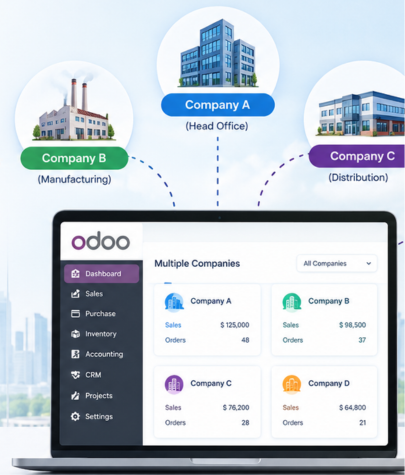
Odoo provides businesses with a centralized ERP environment where multiple companies can be managed from one system while keeping company-specific information, transactions, users, accounting, and operations properly organized.
What Is Odoo Multi-Company Management?
Odoo multi-company management allows businesses to configure and operate multiple companies within the same Odoo environment.
For example, imagine a business group has:
- Company A in India
- Company B in the United States
- Company C in the United Kingdom
- A separate subsidiary for manufacturing
- Another company for distribution
Instead of maintaining completely separate ERP systems, the organization can manage these companies within one Odoo environment, while applying appropriate company-level rules and access permissions.
This can help management get a broader view of business performance while allowing individual companies to maintain their own operational and financial information.
Why Do Businesses Need Multi-Company ERP?
Managing multiple companies using disconnected systems can create several challenges.
Employees may need to:
- Enter customer information into different systems
- Maintain separate product databases
- Prepare reports manually
- Transfer information between accounting systems
- Reconcile transactions across companies
- Manage different user accounts
- Maintain separate inventory records
- Track inter-company transactions manually
These processes consume time and increase the possibility of errors.
A multi-company ERP system brings many of these processes into a connected environment. Instead of managing every company completely independently, organizations can establish common processes while maintaining company-specific data and rules.
How Odoo ERP Helps Manage Multiple Companies
Odoo supports several business functions that can be useful for organizations operating multiple companies.
1. Manage Multiple Companies from One Odoo System
One of the biggest advantages of Odoo multi-company management is centralized access.
An organization can configure multiple companies within its Odoo environment and allow authorized users to work with the companies relevant to their roles.
This reduces the need to maintain separate software environments for every company.
Management can also have a more connected view of business activities while maintaining appropriate separation between companies.
2. Separate Company Data and Operations
Although multiple companies can operate within one Odoo environment, businesses still need proper separation of their information.
Company-specific records and transactions can be managed according to the organization’s configuration.
This can help businesses maintain clearer records for:
- Sales
- Purchases
- Accounting
- Inventory
- Customers
- Vendors
- Products
- Employees
- Expenses
- Financial reporting
Proper configuration is important because every organization may have different requirements for data sharing and access.
3. Control User Access
Not every employee needs access to every company.
For example, an accountant may need access to two companies, while a sales employee may only work with one company.
Odoo allows businesses to configure user access and company visibility according to business requirements.
This can help organizations maintain better control over sensitive business information and reduce unnecessary access.
4. Manage Multiple Currencies
International businesses often operate using different currencies.
For example:
- India may use INR
- The United States may use USD
- The United Kingdom may use GBP
- European operations may use EUR
Odoo’s accounting capabilities can support businesses that work with multiple currencies.
This can make it easier for organizations to manage international transactions and maintain financial records according to their business requirements.
Multi-currency configuration should be planned carefully because exchange rates, accounting requirements, tax rules, and reporting requirements can differ between companies and countries.
5. Manage Inter-Company Transactions
Businesses operating multiple companies may regularly purchase products or services from another company within the same business group.
For example:
Company A → sells products → Company B
Without an integrated system, employees may have to manually create and reconcile transactions between the two companies.
With an appropriately configured Odoo environment, businesses can streamline inter-company workflows and reduce repetitive manual work.
This is especially useful for organizations that frequently transfer products, services, or financial transactions between subsidiaries.
6. Centralize Business Reporting
Management needs accurate information to make better decisions.
When every company uses a different system, creating consolidated business reports can become difficult.
A centralized Odoo environment can make it easier to organize company-level information and provide management with a broader view of business performance.
Businesses can use reports to analyze areas such as:
- Sales performance
- Purchase activity
- Inventory
- Expenses
- Revenue
- Receivables
- Payables
- Company-level performance
The exact reporting structure should be designed according to the organization’s accounting and management requirements.
Odoo Multi-Company Example
Consider a business group that operates three companies:
Company 1: Manufacturing
Company 2: Distribution
Company 3: Retail
The manufacturing company produces products and supplies them to the distribution company.
The distribution company then supplies products to the retail company.
If each business operates independently, employees may spend significant time creating documents, sharing information, and reconciling transactions.
With an appropriately designed Odoo multi-company setup, these companies can operate within a connected ERP environment.
The organization can establish workflows for:
- Manufacturing
- Internal product movement
- Sales and purchasing
- Inventory management
- Inter-company transactions
- Accounting
- Reporting
This creates a more structured business workflow while allowing each company to operate according to its own requirements.
Odoo Multi-Company vs Separate ERP Systems
Businesses sometimes ask whether they should use one multi-company ERP or separate ERP systems for each company.
There is no single answer for every organization.
A centralized Odoo multi-company setup can be attractive when companies have similar processes, shared operations, common products, or frequent inter-company transactions.
Separate systems may be more suitable when companies have significantly different operational structures, technology requirements, compliance environments, or independent management processes.
The right decision depends on the organization’s structure and long-term business goals.
Common Challenges in Odoo Multi-Company Implementation
Multi-company ERP implementation can provide significant benefits, but incorrect configuration can create problems.
Common challenges include:
- Incorrect user access configuration
- Poor company structure planning
- Duplicate master data
- Incorrect accounting configuration
- Complex inter-company workflows
- Inconsistent business processes
- Poor data migration planning
- Inadequate user training
- Reporting configuration issues
These challenges can be reduced through proper planning, testing, documentation, and professional Odoo implementation. Conversion still depends on the customer’s needs, your offer, and the quality of the sales conversation.
How Brainwings Infotech Can Help
Choosing the right implementation approach is important when managing multiple companies through Odoo.
Brainwings Infotech provides Odoo ERP development, customization, integration, implementation, consulting, migration, support, and related Odoo services. The company works with businesses to understand their requirements and configure solutions around their operational needs.
Build your Odoo AI workflow with Brainwings Infotech
Choosing the right implementation approach is important when managing multiple companies through Odoo.
Brainwings Infotech provides Odoo ERP development, customization, integration, implementation, consulting, migration, support, and related Odoo services. The company works with businesses to understand their requirements and configure solutions around their operational needs.
For a multi-company Odoo project, the process can include:
- Business Requirement Analysis
Understand the structure, processes, companies, users, and reporting requirements. - Multi-Company Planning
Define companies, access rules, workflows, accounting requirements, and data-sharing requirements. - Odoo Configuration
Configure the appropriate Odoo modules and company settings. - Customization and Integration
Customize workflows or integrate external systems when standard functionality does not meet business requirements. - Data Migration
Plan and migrate relevant business data carefully when moving from an existing ERP or other systems. - Testing
Test company access, transactions, accounting flows, reports, and inter-company processes before going live. - Training and Support
Help users understand the new workflows and provide ongoing technical or functional support.
Brainwings Infotech also provides Odoo integration services for connecting Odoo with websites, payment gateways, CRM systems, shipping platforms, and other business tools.
Final Thoughts
Managing multiple companies does not have to mean managing multiple disconnected systems.
With the right configuration, Odoo ERP for multi-company businesses can bring different companies and business processes into one connected ERP environment. From user access and accounting to inventory, sales, inter-company transactions, and reporting, Odoo can provide a structured platform for growing organizations.
If your business operates multiple companies and you are planning to implement, customize, integrate, or improve Odoo ERP, working with an experienced Odoo development company can help you design a solution that fits your business structure.
Brainwings Infotech can help businesses plan and develop Odoo solutions based on their specific operational requirements.